DLT Blockchain Network deployment using Docker
Hyperledger Bevel is targeted for Production systems, but for quick developer deployments, you can use the containerized Ansible controller to deploy the dev DLT/Blockchain network.
Prerequisites
Follow instructions to install and configure common prerequisites. In summary, you should have details of the following:
A machine (aka host machine) on which you can run docker commands i.e. which has docker command line installed and is connected to a docker daemon.
At least one Kubernetes cluster (with connectivity to the host machine).
At least one Hashicorp Vault server (with connectivity to the host machine).
Read-write access to the Git repo (either ssh private key or https access token).
Steps to use the bevel-build container
Clone the git repo to host machine, call this the project folder
git clone https://github.com/hyperledger/bevel
Depending on your platform of choice, there can be some differences in the configuration file. Please follow platform specific links below to learn more on updating the configuration file.
Create a build folder in the project folder:
cd bevel
mkdir build
The
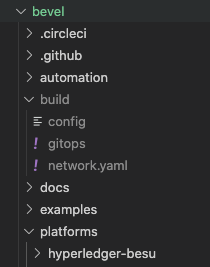
buildfolder should have the following files:K8s config file as config
Network specific configuration file as network.yaml
If using SSH for Gitops, Private key file which has write-access to the git repo
Screen shot of the folder structure is below:
Ensure the configuration file (
./build/network.yaml) has been updated with the DLT network that you want to configure.Run the following command to run the provisioning scripts, the command needs to be run from the project folder. The command also binds and mounts a volume, in this case it binds the repository
cd bevel

docker run -it -v $(pwd):/home/bevel/ --network="host" ghcr.io/hyperledger/bevel-build:latest

# For Corda use jdk8 version
docker run -it -v $(pwd):/home/bevel/ --network="host" ghcr.io/hyperledger/bevel-build:jdk8-latest
In case you have failures and need to debug, login to the bash shell
docker run -it -v $(pwd):/home/bevel/ --network="host" ghcr.io/hyperledger/bevel-build:latest bash

# go to bevel directory
cd bevel
# Run the provisioning scripts
ansible-playbook  platforms/shared/configuration/site.yaml -e "@./build/network.yaml"
For instructions on how to verify or troubleshoot network, read How to debug a Bevel deployment.