Hyperledger Fabric Architecture Reference
Kubernetes
Peer Nodes
The following diagram shows how Hyperledger Fabric peer nodes will be deployed on your Kubernetes instance.
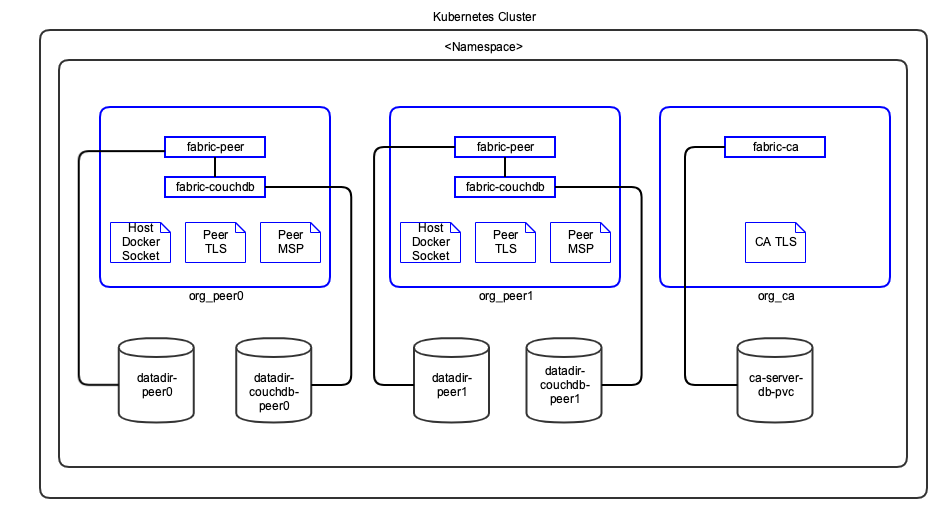
Notes:
Pods are shown in blue in the diagram.
Each peer pod will have both
fabric-peerandfabric-couchdbcontainers running. Since they are in the same pod, Kubernetes always schedules them on the same VM and they can communicate to each other through localhost. This guarantees minimal latency between them.Host VM’s Docker socket is attached to peer pod so it can create chaincode containers. Kubernetes is not aware of these containers.
TLS and MSP certificates are mounted as in-memory volumes from the Vault.
The storage uses a Kubernetes Persistent Volume.
Orderer Nodes
The following diagram shows how Hyperledger Fabric orderer will be deployed on your Kubernetes instance.
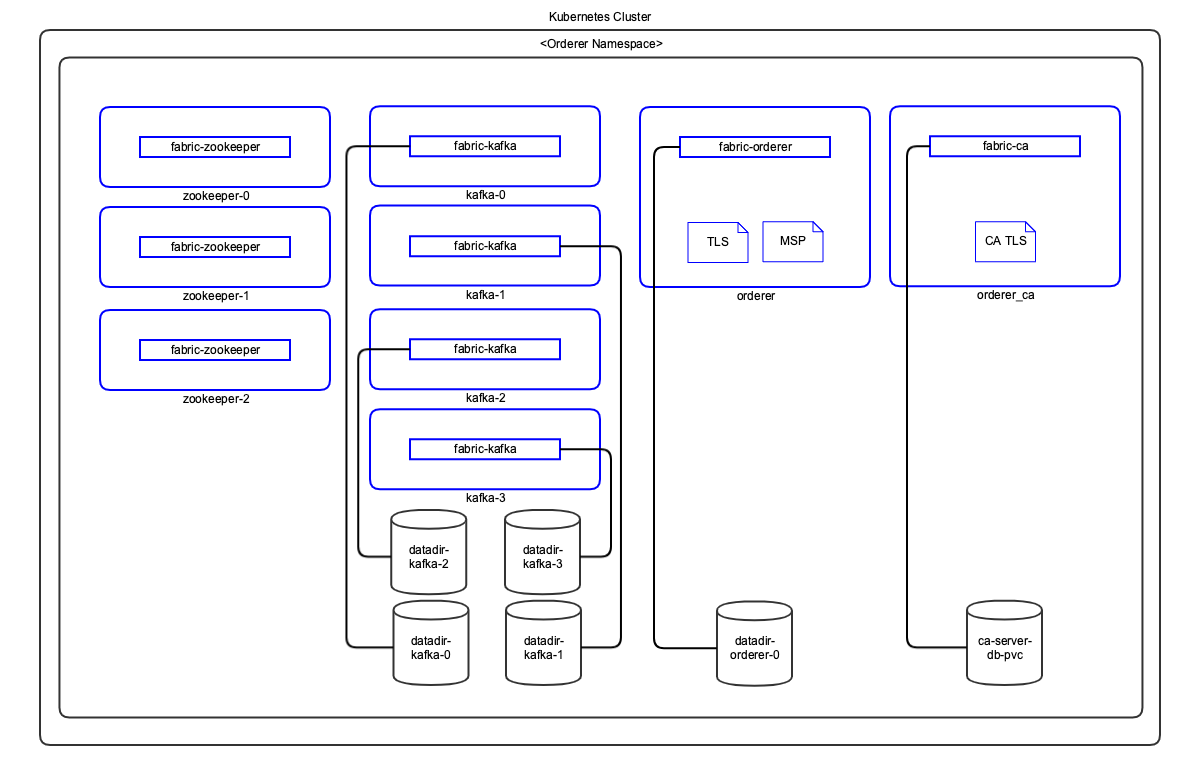
Notes:
Pods are shown in blue in the diagram.
TLS and MSP certificates are mounted as in-memory volumes from the Vault.
The storage uses a Kubernetes Persistent Volume.
Components
Docker Images
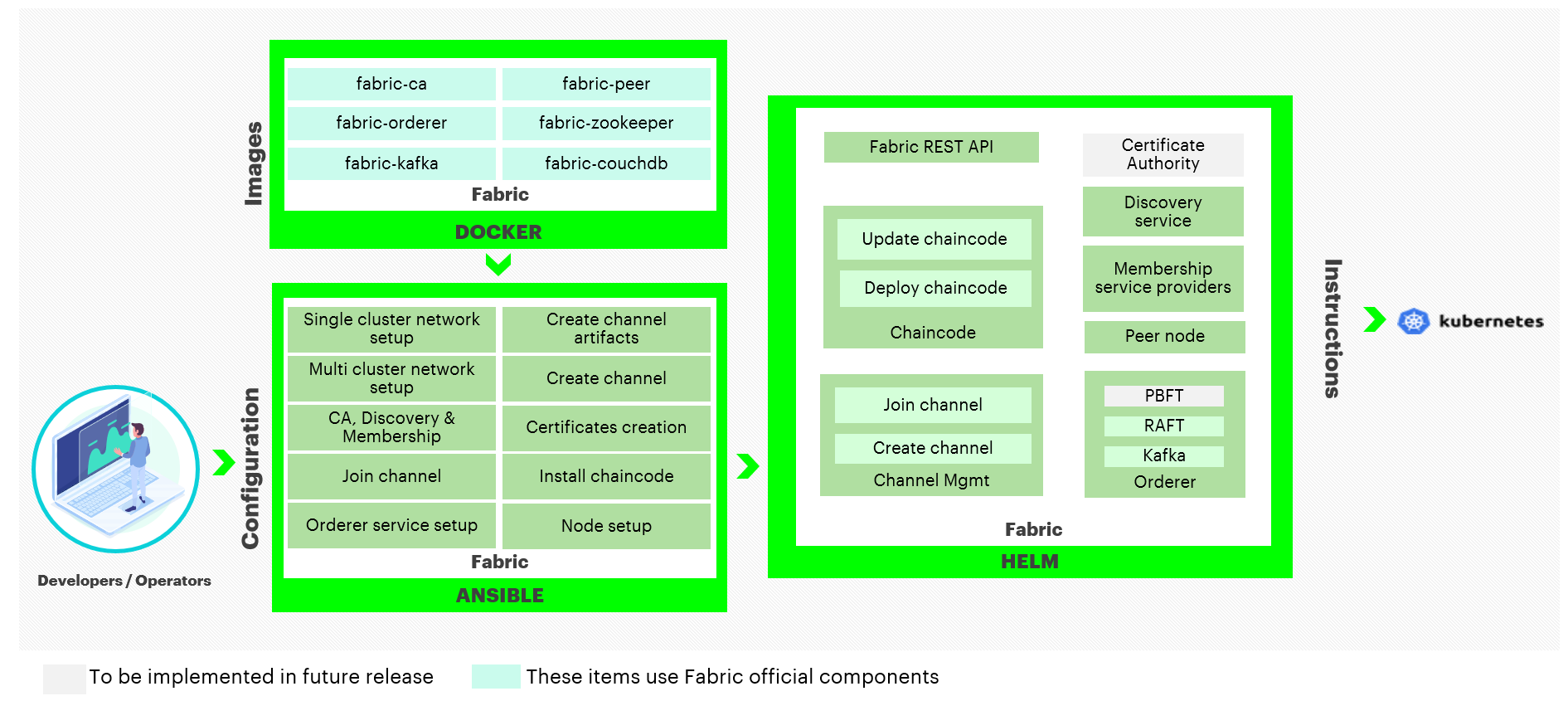
Hyperledger Bevel uses the officially published Hyperledger Fabric Docker images from hub.docker.com. The following Hyperledger Fabric Docker Images are used by Hyperledger Bevel.
fabric-ca - Hyperledger Fabric Certificate Authority
fabric-couchdb - CouchDB for Hyperledger Fabric Peer
fabric-kafka - Kafka for Hyperledger Fabric Orderer
fabric-orderer - Hyperledger Fabric Orderer
fabric-peer - Hyperledger Fabric Peer
fabric-zookeeper - Zookeeper for Hyperledger Fabric Orderer
Ansible Playbooks
Detailed information on ansible playbooks can be referred here and the execution process can be referred here
Helm Charts
Detailed information on helm charts can be referred here
Vault Configuration
Hyperledger Bevel stores their crypto and credentials immediately within the secret secrets engine.
Optionally, secret_path can be set on the network.yaml to change the secret engine from the default secretsv2/.
| Crypto Material Path | Credentials Path |
|---|---|
secretsv2/crypto |
secretsv2/credentials |
secretsv2/credentials/ordererOrganizations/<orderer-org>/ca- Contains password for the Orderer CA Bootstrap user in the format:
user="${ORDERER_NAMESPACE}-adminpw
secretsv2/credentials/peerOrganizations/<org1>/ca- Contains password for the Org Peers CA Bootstrap user in the format:
user="${NAMESPACE}-adminpw
secretsv2/credentials/peerOrganizations/<org1>/<peern>couchdb- Contains the password for the Peer’s CouchDB user in the format:
pass="${NAMESPACE}-peer-${n}-adminpw
The complete Certificate and key paths in the vault can be referred here.